
igeo.ai Marketplace helps you publish PR and editorial content on third-party sites through one workflow: choose a publisher, create an article, review it, and follow its publication. With access to more than 30,000 websites worldwide, you can find opportunities to reach relevant audiences beyond your own website.
This tutorial shows you how to use that workflow with a clear goal: put useful information about your brand where potential customers can discover it, then measure what happens. Start with one well-matched publication and one buyer question.
Watch the Marketplace tutorial
In this 47-second walkthrough, Shira introduces the journey from finding a publication to reviewing content and tracking its progress.
Follow along with these moments in the video:
- 0:00 — Why third-party content matters: your own channels are part of a broader information landscape.
- 0:11 — Choose a publication: consider its audience, reach, and presence in AI answers.
- 0:18 — Create an article: select a topic and the buyer question you want to address.
- 0:23 — Review and submit: edit the draft before sending it to your chosen publisher.
- 0:33 — Track progress: use Publications to follow your articles.
What Marketplace adds to your visibility strategy
Your website explains your business in your own words. A relevant third-party article places that information in another context: an industry publication, a specialist website, or a source your audience already reads. That can introduce your brand to new readers and give people more information when they research a purchase.
The GEO marketplace connects this distribution work with your generative engine optimization strategy. Instead of picking a website solely for its headline traffic number, you can also consider the sources appearing in the AI answers you track.
The Marketplace page makes this distinction tangible with “Same inventory. Two leaderboards.” Its interactive example compares publishers by AI citation rank and SEO authority rank. Try the same sample data here, then explore Marketplace for the complete filtering and publishing demo.
If you are comparing a traditional backlink marketplace with a GEO marketplace, this is the question to ask: does a publication fit the buyer questions and sources you want to be associated with, as well as your broader SEO goals? The demo illustrates that difference; its rankings are sample data rather than live publisher measurements.
The useful distinction is between publishing an article and earning a result. Publishing gives your content a new home. Referral visits, brand mentions, citations, and leads are outcomes to measure afterward; a placement does not guarantee them.
Step 1: Find a publisher that fits your audience
In the app, open Optimization → Marketplace, then choose All Sites. Start with the Categories and Countries filters to narrow the catalogue to the subject and market you want to reach. Use search when you already have a domain in mind.
Compare the signals in the Publishing Sites table:
| Field | How to use it |
|---|---|
| Domain | Open the publisher’s website and review its actual articles. |
| Origin and Category | Check whether its market and subject matter match your audience. |
| Traffic | Use the estimated monthly organic visits as context for potential reach, not a forecast for your article. |
| Rank | The current app describes this as Domain Rating, a backlink-authority metric. It is separate from AI mentions. |
| Credits | Compare the publishing cost with the budget for your campaign. |
| Mentions | See how often the domain appears as a source in your AI visibility tracking. |
For example, a software company explaining how to evaluate a new tool may find a focused technology publication more relevant than a broad lifestyle site. Read a few recent articles before making your choice: the topic, reader, and editorial style should fit your brief.
The Sources filter helps you explore publishers in relation to your tracked sources. If a filtered view is empty, broaden the filters to see more of the catalogue. Your current filters and market determine the selection you see; the network total is not the number of sites in every filtered view.
Step 2: Turn a buyer question into an article brief
Click Create article beside a publisher to open the brief. The dialog shows the selected domain, its categories, and the credit cost. Choose a Topic, then a Prompt representing the buyer question you want the article to answer. Add Additional instructions when the draft needs a particular angle or supporting information.
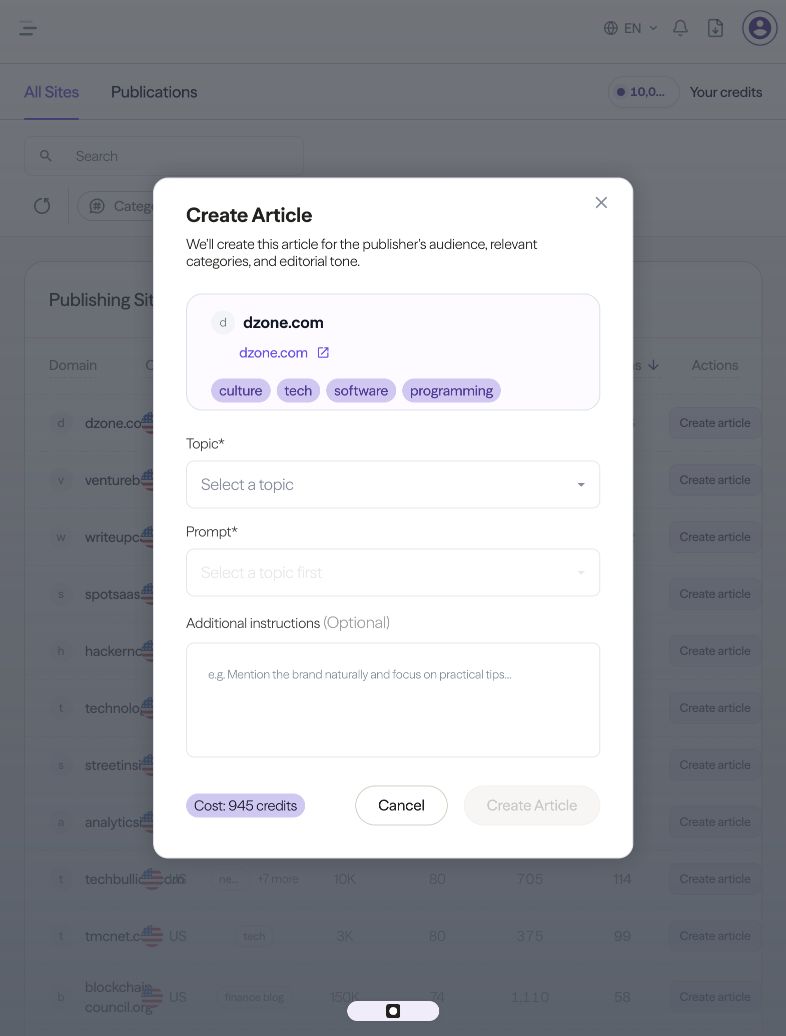
A focused brief makes the review easier. For a hypothetical reporting platform, you might use a buyer question such as “How should a small marketing team compare reporting tools?” and add:
Write for a small marketing team evaluating reporting software. Explain the selection criteria with practical examples. Use only verified product capabilities and supplied evidence. Describe where our product fits naturally, and link to the relevant product page. Avoid unsupported claims about competitors or guaranteed results.
Prepare your approved product facts, source material, and destination page before generating the article. A specific reader and question give the draft a useful purpose beyond repeating the brand name.
AI already decides how your brand shows up.
Every prompt, citation, and recommendation is a signal. igeo.ai turns that behavior into clear answers and the next action, whether that’s a page to rewrite, a schema to add, or a story to publish.
Step 3: Review, edit, and approve the content
Generate the article, then review the draft before submitting it. Shira’s walkthrough shows this editing stage as part of the publishing workflow.
Read it as someone encountering your brand for the first time. Does it answer the question? Does it explain what your business does accurately? Are the examples specific enough to help a reader make a decision?
Check product names, factual claims, statistics, quotes, and links against your source material. Replace generic promotional language with useful explanations. Make sure the destination link takes readers to the page that supports the article’s subject, such as a product explanation, a relevant guide, or a demo page.
Finally, review the publisher’s content requirements and the displayed credit cost. Submit when the article is ready for that audience. The writing and review steps give you control over the message before it reaches a third-party publication.
Step 4: Follow the article in Publications
Open Publications to follow your articles. The view includes search plus filters for Article Type, Website, Status, and date. The Status menu includes Draft, Pending, Published, Failed, and Cancelled.
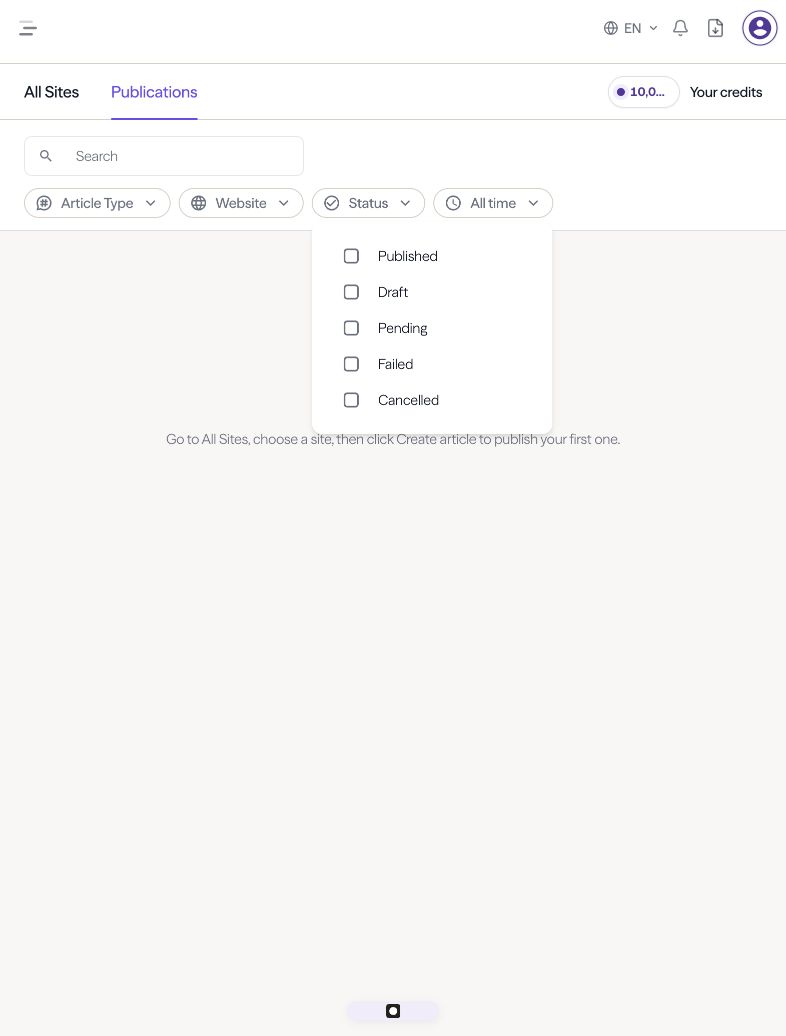
Submission and publication are separate steps. The Marketplace notice says publication may take up to seven business days, and a publisher may reject an article under its content or link policies. The notice also explains the option to choose another site or receive a credit refund if an article is rejected. Use the current app status and terms for your submission.
Once an article is published, record the live URL and publication date. That gives you a clear starting point for evaluating its effect.
Step 5: Measure traffic and AI visibility separately
Before publishing, save a baseline for the buyer questions and markets you care about. After publication, keep those questions consistent so you can compare observations over time.
Use AI visibility monitoring to check brand mentions and cited sources. Pair that with analytics to investigate visits and downstream outcomes. Track three distinct questions:
- Is the article live? Confirm the URL, content, and links on the publisher’s website.
- Are readers reaching you? Look for identifiable referral visits and the actions those visitors take.
- Are relevant AI answers changing? Compare repeated observations of the same prompts, markets, and engines, including which sources are cited.
Avoid attributing every change to a single placement. Other content, campaigns, and changes in search systems may happen during the same period. Keep a simple log of what you published, where, and when, then use the evidence to decide which topics and publishers to try next.
Start with one useful article
Choose one buyer question, one relevant publisher, and one clear next step for the reader. Create the brief, review the draft, and track the result before expanding the campaign.
Explore igeo.ai Marketplace to see how publisher selection and content creation work together, or book a demo to walk through the workflow for your brand.
Frequently asked questions
What is igeo.ai Marketplace?
igeo.ai Marketplace is a publishing workflow for placing content on third-party websites. It brings publisher selection, article creation, editing, submission, and publication tracking into the igeo.ai platform, with access to a network of more than 30,000 websites worldwide.
How do I choose a website for my article?
Start with audience and topic relevance. Use the Categories and Countries filters, then compare traffic estimates, rank, credits, and source mentions. Visit the publisher’s website to check that its content and readership fit your story. A high score alone does not make a site the right choice.
Can I review the article before it is submitted?
Yes. The workflow lets you generate an article, review and edit the draft, and approve it before sending it to your selected publication. Check the facts, links, brand description, and fit with the publisher’s audience before submitting.
How long does publication take?
The Marketplace publishing notice says publication may take up to seven business days. Articles can be rejected under a publisher’s content or link policies. If that happens, the notice provides for choosing another site or receiving a credit refund. Check the current terms and status in the app.
Does a placement guarantee more traffic or an AI citation?
No. A placement creates an opportunity for readers and search systems to discover your content. Traffic, citations, and recommendations depend on relevance, content quality, discovery, and other factors. Track publication, referral visits, and AI visibility separately to understand the results.
Where can I track the articles I create?
Open the Publications tab in Marketplace. Use its search and Article Type, Website, Status, and date filters to find articles. Status options include Draft, Pending, Published, Failed, and Cancelled. Use your visibility monitoring and analytics alongside these publishing records to evaluate performance.